
Managed IT, SOC Monitoring and Penetration Testing: A Practical Security Guide for Zimbabwean Businesses
Walk into almost any Zimbabwean office today and you will find the same picture. Customers pay by mobile money, the accountant works in a cloud package, staff check email on their phones, and a few people now work from home. It all makes business easier. It also means there are far more doors into your company than there used to be, and plenty of firms have nobody whose full-time job is to watch them.
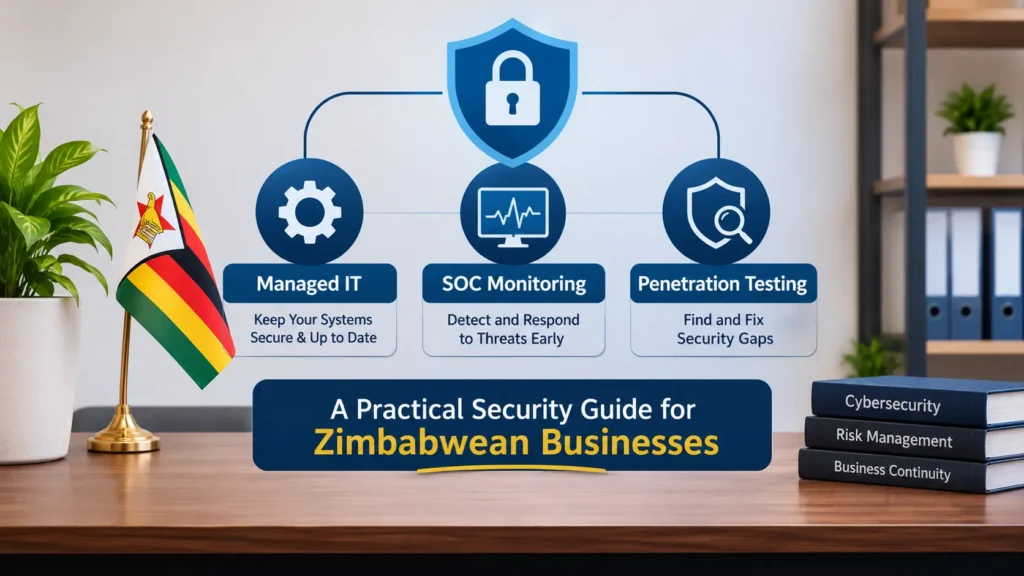
This guide looks at three services that tend to come up whenever a business starts taking security seriously: managed IT, security operations centre (SOC) monitoring, and penetration testing. It explains what each one does, how they support one another, and how to get started without spending money in the wrong places.
Why this matters for Zimbabwean organisations
Most attacks are not personal. Criminals run automated scans looking for exposed systems, send phishing emails by the thousand, and try passwords that leaked from some other breach. Ransomware, fake invoices and business email fraud usually succeed because of ordinary slips: a server nobody patched, a password used in three places, an employee in a hurry.
Local conditions make this harder. Budgets are tight and IT teams are small, often just one person covering everything from printers to firewalls. Many organisations run older equipment alongside newer cloud tools that were never designed to fit together. Power cuts and patchy connectivity can interrupt updates, backups and monitoring. And when something does go wrong, the urgent goal is getting people back to work, which means the question of how the attacker got in often goes unanswered. That is one reason many businesses look for outside help, and a Harare-based team such as Cybersecurity Zimbabwe offers managed IT, SOC monitoring and penetration testing under one roof. A provider that understands the local setting can suggest protection that suits your budget, your infrastructure and the risks you actually face, rather than copying a template built for a very different market.
There is also a legal side. Zimbabwe has data protection legislation, and organisations holding customer or staff information are expected to look after it properly. Even where no rule applies directly, a breach costs trust, interrupts operations and takes time and money to clean up.
Managed IT: the foundation
Managed IT simply means a specialist provider takes over the day-to-day running and support of your technology, usually for a predictable monthly fee. It sounds like an administrative service, but it is the base everything else sits on. Most breaches come from basic hygiene failures, not clever attacks, and a well-run environment closes a lot of those gaps before anyone can use them.
Patching. Software vendors release updates to fix security flaws, and once a flaw is public, attackers race to exploit it on anything that has not been updated. A managed provider keeps operating systems, applications, firewalls and network equipment current, and keeps track of which devices are falling behind. It is unglamorous work and one of the most effective things you can do.
Backups. If ransomware hits, or a server dies, your backups decide how bad the day gets. But they only help if they work. A good setup includes regular backups, at least one copy kept away from your main network, and occasional test restores. Plenty of organisations find out their backups are incomplete only when they urgently need them.
Access and devices. Managed IT also covers who can get into what. That means strong passwords, multi-factor authentication on email and critical systems, accounts removed promptly when people leave, and administrator rights kept to a minimum. On the device side, it means endpoint protection on laptops, desktops and servers, plus an accurate inventory of everything connected to the network. You cannot protect what you do not know you have.
People. A responsive help desk matters more than it seems. Staff who can quickly report a suspicious email, and get a straight answer, are less likely to find workarounds that weaken security. Short, regular sessions on how phishing attacks work, along with password habits and safe use of mobile money and banking apps, often do more good than another piece of software.
SOC monitoring: someone watching while you work
Prevention reduces risk but never removes it. Sooner or later something gets through, and how much damage it does depends largely on how quickly someone notices. A security operations centre is a team, backed by tooling, that watches your systems continuously for signs of trouble.
Your servers, firewalls, endpoints, email platforms and cloud services all produce logs. On their own, those logs are mostly noise. A SOC pulls them together, applies detection rules and human judgement, and picks out activity that looks wrong: repeated failed logins followed by a successful one, a sign-in from an unexpected location, or a machine suddenly talking to servers it has never contacted before.
When something is flagged, an analyst looks into it to separate real threats from false alarms. If it turns out to be genuine, the team helps contain it, perhaps by isolating an infected machine, disabling a compromised account or blocking a malicious address, and then advises on cleanup and how to stop it happening again.
Building a SOC in-house is expensive. It takes specialised tools, trained analysts and round-the-clock cover, because attackers do not keep office hours. For most organisations in Zimbabwe, outsourcing is the more realistic route, giving you experienced people and mature processes without hiring a whole team.
If you are comparing providers, a few questions are worth asking:
- Which systems and log sources will be monitored?
- Is coverage continuous, or only during business hours?
- How fast will you be told about a serious incident, and how?
- What will the provider do during an incident, and what is left to you?
- What will the reports look like, and could a non-technical manager follow them?
Clear answers are a good sign. Vague promises of “total protection” are not.
Penetration testing: finding the holes first
A penetration test, or pen test, is an authorised, controlled attempt to break into your systems. Experienced testers use the same methods a real attacker would, but within agreed rules, and they tell you everything they find so you can fix it.
It is often confused with a vulnerability scan, but the two are different. A scan is largely automated: it checks your systems against a database of known weaknesses and produces a list. That is useful, but a list does not tell you how much any of it matters. A pen tester goes further. They chain weaknesses together, try to get around your controls, and show what an attacker could actually reach, whether that is customer records, the finance system or an administrator account.
Tests come in several forms, and the right one depends on what you are trying to protect:
- External testing looks at what someone on the internet can see and exploit, such as websites, mail servers and remote access portals.
- Internal testing assumes an attacker already has a foothold, perhaps through a compromised laptop, and shows how far they could move.
- Web and mobile application testing looks for flaws in customer portals, online shops and apps, such as weak login protection or careless handling of data.
- Wireless testing checks whether your office Wi-Fi could be used to reach internal systems.
- Social engineering tests whether staff can be fooled by phishing emails or phone calls.
A professional engagement starts with a written scope and authorisation, so everyone knows what is and is not being tested. The testers then work through discovery, exploitation and analysis. At the end you should get a report that explains each finding, how serious it is, how it was demonstrated and how to fix it, with a summary for decision-makers and technical detail for your IT staff. Once you have made the fixes, a retest confirms they actually worked.
Timing matters too. It makes sense to test after major changes such as launching a new website, moving to the cloud or opening a new branch, and many organisations repeat testing on a regular cycle.
How the three fit together
These services work best as a set rather than as separate purchases.
Managed IT cuts down the number of weaknesses by keeping systems patched, backed up and properly configured. Penetration testing checks how well that work holds up against a realistic attacker, and finds gaps that routine maintenance misses. SOC monitoring watches for whatever slips past both, and shortens the time between an intrusion and a response.
They also feed each other. A pen test might show that a certain kind of attack would go unnoticed, which tells the SOC what detection to add. A SOC alert might reveal a recurring weakness that managed IT can then fix for good. Over time that loop steadily lowers your risk.
Choosing a provider
Look for people who explain things plainly, ask questions before recommending anything, and are upfront about what they can and cannot do. A few practical checks help:
- Do they understand local realities such as connectivity, power and budget limits?
- Is it clear what is included, what costs extra, and how you can leave if you need to?
- How do you reach them in an emergency, and what response times do they commit to?
- Will you receive reports that management can act on, rather than raw technical output?
- Will they sign a non-disclosure agreement, and how do they protect the data they handle for you?
Be wary of anyone who guarantees you will be “unhackable”. No honest provider can promise that.
A realistic first 90 days
You do not need to do everything at once. For a mid-sized organisation, a sensible order might look like this.
First month: basics. List your devices, systems and key data. Turn on multi-factor authentication for email and administrator accounts. Review who has access to what and remove old accounts. Check that backups exist, are stored separately and can really be restored.
Second month: close the obvious gaps. Bring patching up to date on servers, laptops and network equipment. Make sure endpoint protection is installed and reporting. Run a short awareness session on phishing and payment fraud. Write a simple incident plan that says who to call and what to do first.
Third month: add visibility and testing. Start monitoring your most critical systems, such as email, servers and remote access. Commission a penetration test of your most exposed assets, like your website or customer portal, and plan to fix the findings in order of seriousness.
Mistakes worth avoiding
The most common one is assuming you are too small to be a target. Automated attacks do not pick victims by size, and smaller firms are often easier to break into because they have fewer defences.
Another is buying tools without a plan. Software alone does not make you secure; it needs configuration, monitoring and people who understand what the alerts mean. Closely related is treating security as a one-off project, when threats and systems change all the time and what you need is a steady routine of maintenance, monitoring and review.
It is also easy to overlook the human side. One convincing phishing email can undo a lot of good technical work, so training and a clear way to report problems matter. Finally, an incident plan that has never been rehearsed tends to fall apart under pressure, so walk through a realistic scenario at least once a year.
Final thoughts
Cybersecurity can feel overwhelming, but it gets manageable once you break it into layers. Managed IT gives you a stable, well-maintained foundation. SOC monitoring adds constant watchfulness and a faster response. Penetration testing gives you an honest look at your defences and shows where to improve first.
For Zimbabwean businesses, the aim is not perfection. It is steady, realistic progress: fewer easy openings, quicker detection, and a team that knows what to do when something goes wrong. Start with the basics, build up visibility, test what matters most, and work with partners who are clear, local and honest about what security can and cannot deliver.