
Why AI Tools Are Transforming Student Learning in 2026
Artificial intelligence has become one of the biggest drivers of change in education. In 2026, students are no longer using AI just to find quick answers they rely on it to understand complex concepts, organize study materials, improve writing, create presentations, and prepare for exams more efficiently. According to UNESCO, AI has the potential to make learning more personalized when used responsibly, while the World Economic Forum highlights AI literacy as an increasingly valuable future skill. Instead of replacing learning, the best AI tools help students learn faster, think critically, and manage their academic workload with greater confidence.
The Impact of AI on Student Learning
Students today study differently than they did only a few years ago. AI can summarize lengthy chapters, explain difficult topics in simple language, generate practice quizzes, and provide instant feedback. Rather than spending hours searching for information, learners can focus more on understanding concepts and improving their problem-solving skills.
Key Benefits of Using AI for Education
The biggest advantage of AI is personalized learning. Students receive explanations based on their learning level, save time on repetitive tasks, improve writing quality, and stay organized. AI also supports brainstorming, language learning, research, coding, and exam preparation, making it useful across almost every academic subject.
Who Can Benefit from AI Tools?
AI tools are valuable for high school students, college learners, university researchers, online learners, and even educators. Whether someone needs homework assistance, research support, better writing, presentation design, or study planning, modern AI platforms offer practical solutions that fit different learning styles and educational goals.
How We Selected the Best AI Tools for Students
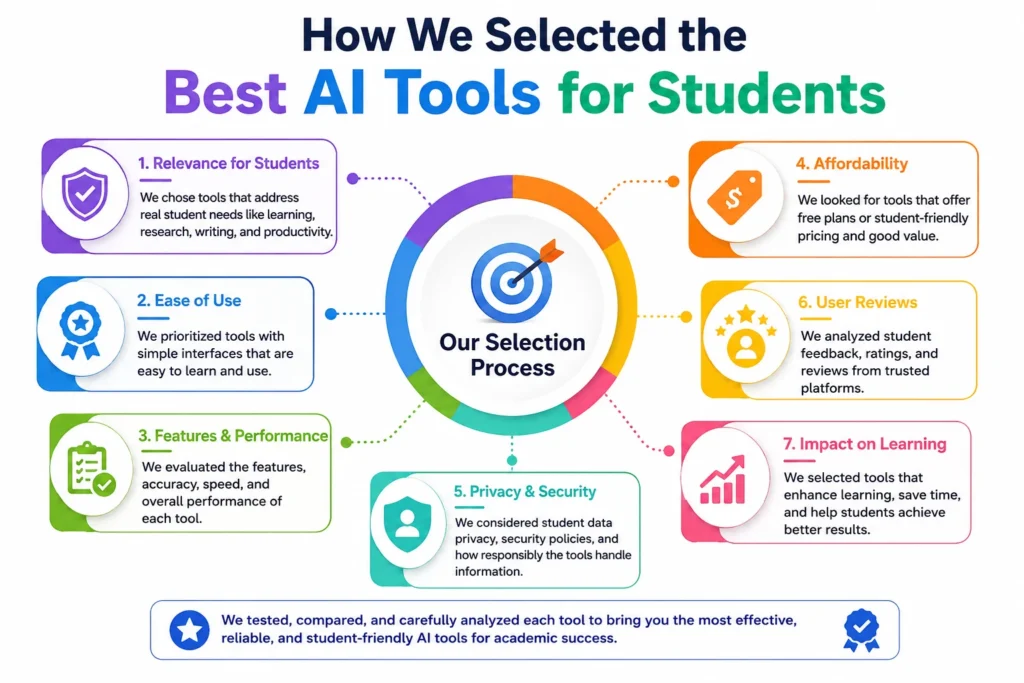
With hundreds of AI applications available in 2026, choosing the right ones requires more than popularity alone. We evaluated every tool based on educational value, response accuracy, ease of use, affordability, privacy practices, and overall student experience. We also considered real-world usage, feature updates, and reputation among educators and learners. Our recommendations include tools that genuinely improve productivity, research, writing, creativity, and learning rather than simply generating text, ensuring students receive practical value for both academic success and long-term skill development.
Evaluation Criteria
Every AI tool was evaluated using clear standards, including accuracy, educational usefulness, speed, interface quality, reliability, collaboration features, and overall learning support. We also considered how well each platform handles complex questions, provides trustworthy information, and adapts to different academic subjects and student needs.
Free vs Paid Features
Many AI platforms offer generous free plans, while premium subscriptions unlock advanced capabilities like larger context windows, faster responses, priority access, and enhanced collaboration. We compared both versions to identify which free tools provide excellent value and which paid upgrades are worth considering.
Ease of Use, Accuracy, and Privacy
A great student AI tool should be simple to learn, highly accurate, and transparent about data handling. We favored platforms with intuitive interfaces, reliable responses, strong privacy policies, and regular updates. Responsible AI practices were also considered because protecting student information is increasingly important.
Best for High School, College, and University Students
Different education levels require different capabilities. High school students often need concept explanations and homework support, while college and university learners require advanced research, writing, analysis, and project management. Our list includes tools that effectively serve students across every academic stage.
You might also like: How to Rank a New Website on Google: Complete SEO Guide
Best AI Tools for Students in 2026 (Detailed Reviews)
The following AI tools consistently rank among the best choices for students in 2026 because they combine powerful AI capabilities with practical educational features. Each platform excels in a specific area, whether it’s research, writing, note-taking, presentations, productivity, or personalized tutoring. Instead of relying on a single application, many successful students combine several of these tools to build an efficient study workflow. Below is a detailed review of each option, including its strengths, ideal use cases, and why it stands out in today’s competitive AI landscape.
ChatGPT – Best Overall AI Study Assistant
ChatGPT remains the most versatile AI study assistant in 2026. It explains difficult concepts, solves math problems, generates study plans, creates quizzes, summarizes notes, and assists with coding and writing. Its multimodal capabilities and strong reasoning make it useful across nearly every subject, from science and engineering to literature and business studies.
Google Gemini – Best AI for Google Productivity Tools
Google Gemini is an excellent choice for students already using Google Docs, Gmail, Sheets, and Drive. It integrates naturally into the Google ecosystem, helping users draft assignments, analyze documents, summarize emails, and conduct research efficiently. Its seamless workflow saves valuable time throughout daily academic activities.
Claude – Best for Writing and Long Documents
Claude excels at understanding lengthy documents and producing well-structured writing. Students can upload research papers, class notes, or reports and receive clear summaries, detailed explanations, and polished writing suggestions. Its large context window makes it especially useful for handling complex academic projects and dissertations.
Perplexity AI – Best AI Research Assistant with Citations
Perplexity AI stands out because it provides answers supported by citations from reliable online sources. Instead of simply generating responses, it encourages evidence-based learning, making it particularly valuable for essays, reports, and academic research.
NotebookLM – Best for Studying from PDFs and Notes
NotebookLM transforms personal study materials into an interactive learning assistant. Students can upload PDFs, lecture slides, textbooks, and notes, then ask questions directly from those documents. The AI stays focused on uploaded content, making revision more accurate and reducing unnecessary information during exam preparation.
Grammarly – Best AI Writing Assistant
Grammarly continues to be one of the best AI writing assistants for students. Beyond correcting grammar and spelling, it improves clarity, tone, sentence structure, and readability. It also helps reduce writing mistakes in essays, emails, scholarship applications, and research assignments while maintaining a professional writing style.
Notion AI – Best AI Workspace for Students
Notion AI combines note-taking, task management, document creation, and AI assistance in one workspace. Students can organize lecture notes, generate summaries, create study schedules, manage projects, and brainstorm ideas without switching between multiple applications, making academic organization significantly easier.
Khanmigo – Best AI Tutor for Learning
Khanmigo focuses on guided learning rather than simply providing answers. Built for education, it encourages students to think critically through hints, questions, and personalized explanations. This teaching-first approach helps learners understand concepts deeply instead of memorizing solutions, making it highly effective for long-term learning.
Gamma – Best for AI Presentations
Gamma allows students to create professional presentations within minutes using AI. Instead of designing every slide manually, users simply provide a topic, and the platform generates structured presentations with attractive layouts, visuals, and content. It is especially useful for classroom presentations and group projects.
Canva Magic Studio – Best for Creative Student Projects
Canva Magic Studio simplifies creative work by using AI to generate presentations, posters, infographics, social media graphics, and educational visuals. Students with little design experience can quickly produce high-quality academic projects using ready-made templates, AI-powered editing tools, and collaborative features that enhance creativity and productivity.
Best AI Tools by Student Needs
Not every student needs the same AI tool. A research student writing a thesis has very different requirements than a high school student preparing for exams or solving math problems. Choosing the right AI tool based on your specific academic needs can save time, improve learning outcomes, and reduce frustration.Below are the best AI tools categorized by common student requirements in 2026.
Best AI Tool for Homework Help
For general homework assistance, ChatGPT remains the strongest option. It explains concepts step by step instead of simply providing answers, supports multiple subjects, generates practice questions, and helps students understand difficult topics. Its conversational approach makes learning interactive and suitable for everyday academic tasks.
Best AI Tool for Research Papers
Perplexity AI is the best choice for research papers because it provides answers with source citations and links to reliable references. Students can quickly gather information, verify facts, discover academic sources, and build stronger arguments while reducing the time spent searching through multiple websites.
Best AI Tool for Math and STEM Subjects
For mathematics, programming, and STEM education, ChatGPT and Google Gemini perform exceptionally well. They explain formulas, solve equations step by step, debug code, simplify scientific concepts, and assist with engineering problems. Their reasoning capabilities help students understand solutions instead of memorizing calculations.
Best AI Tool for Note-Taking
NotebookLM is designed specifically for learning from personal study materials. Students can upload lecture notes, PDFs, textbooks, and research documents, then ask questions directly from those files. This personalized approach improves revision efficiency while keeping responses focused on course-specific content.
Best AI Tool for Presentation Creation
Gamma stands out for creating professional presentations with minimal effort. Students simply enter a topic, and the platform automatically generates structured slides, attractive layouts, visuals, and supporting content. It significantly reduces presentation preparation time while maintaining a polished and modern appearance.
Best AI Tool for Exam Preparation
For exam preparation, ChatGPT and NotebookLM work exceptionally well together. ChatGPT creates quizzes, flashcards, summaries, and revision plans, while NotebookLM helps students review their own notes. This combination supports active recall, one of the most effective evidence-based learning techniques.
Comparison Table of the Best AI Tools for Students
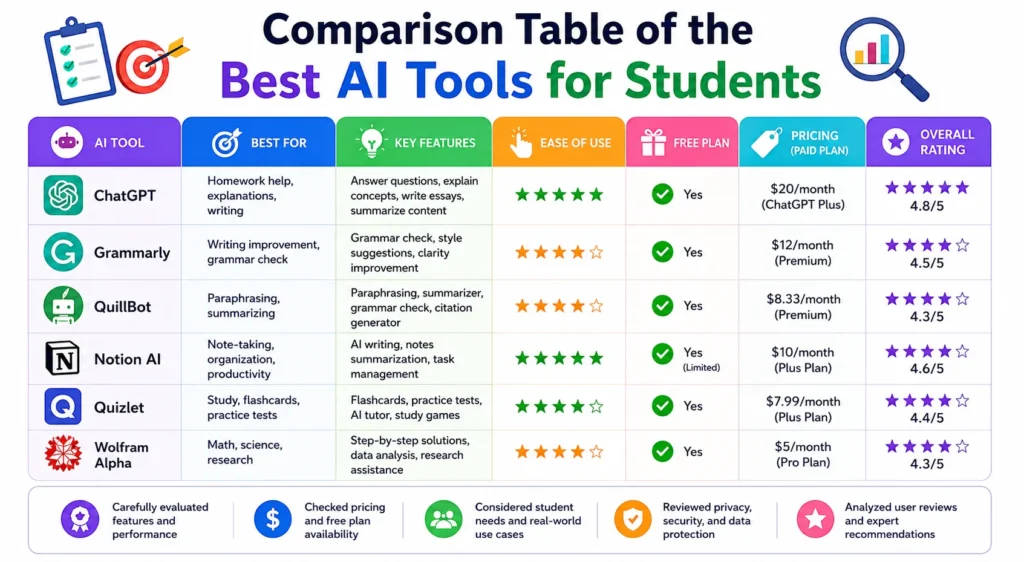
Comparing AI tools side by side makes it easier to identify the right platform for specific academic tasks. Some tools specialize in research, while others focus on writing, organization, presentations, or personalized learning. Instead of selecting software based only on popularity, students should compare practical factors such as features, pricing, platform compatibility, and available free plans. The comparison below highlights the key differences between the leading AI tools for students in 2026, helping learners make informed decisions according to their educational needs and budget.
Features Comparison
The leading AI tools differ significantly in functionality. ChatGPT offers versatile learning support, Claude excels in long-document analysis, Perplexity AI specializes in research with citations, NotebookLM focuses on document-based learning, Grammarly improves writing, while Gamma and Canva Magic Studio simplify presentation and creative project development.
Pricing Comparison
Most AI tools follow a freemium pricing model with optional premium subscriptions. Paid plans generally include faster performance, higher usage limits, larger context windows, advanced AI models, collaboration tools, and additional productivity features. Students should compare subscription benefits before choosing a premium option.
Free Plan Availability
Nearly every major AI platform provides a free version suitable for everyday academic tasks. While free plans include certain usage limits, they remain sufficient for note summarization, writing assistance, brainstorming, and basic research. Premium plans primarily benefit heavy users with advanced academic workloads.
Supported Platforms
The best AI tools support multiple platforms, including web browsers, Windows, macOS, Android, and iOS devices. Many also integrate with cloud services such as Google Workspace and Microsoft Office, allowing students to continue their work seamlessly across different devices and learning environments.
Best Use Cases
Each AI platform performs best in different scenarios. ChatGPT handles general learning, Perplexity AI supports research, Claude improves writing, NotebookLM enhances revision, Grammarly refines grammar, Notion AI organizes productivity, Gamma creates presentations, and Canva Magic Studio helps students produce visually engaging academic projects.
You might also like: Best Android Games in 2026 | Top Free & Offline PicksBest
How Students Can Use AI Responsibly
Artificial intelligence is most valuable when it supports genuine learning rather than replacing it. Schools, colleges, and universities increasingly encourage responsible AI usage while maintaining academic integrity. UNESCO recommends using AI as a learning companion that enhances critical thinking instead of promoting dependency. Students should verify AI-generated information, understand institutional policies, and use AI to improve their knowledge rather than bypass academic effort. Responsible use not only builds stronger skills but also prepares students for workplaces where AI literacy is becoming an essential professional competency.
Avoiding Plagiarism
Students should never submit AI-generated content without reviewing, editing, and properly citing sources when required. AI should assist with brainstorming, outlining, and improving writing rather than producing final assignments. Creating original work remains essential for developing genuine academic and critical thinking skills.
Understanding Academic Integrity Policies
Every educational institution has different policies regarding AI usage. Some allow AI for brainstorming and editing, while others restrict its use during assignments or examinations. Students should always review their school’s academic integrity guidelines before using AI in coursework or research projects.
Using AI to Learn Instead of Copying
The most effective way to use AI is as a personal tutor. Ask it to explain difficult concepts, generate practice questions, simplify theories, or provide feedback on your work. This learning-focused approach develops stronger understanding while maintaining academic honesty and independent thinking.
Tips for Fact-Checking AI Responses
Although modern AI systems are increasingly accurate, they can still produce incorrect or outdated information. Students should verify important facts using trusted academic sources, official publications, peer-reviewed journals, government websites, and textbooks before including AI-generated information in assignments or research papers.
Should Students Choose Free or Premium AI Tools?
Choosing between free and paid AI tools depends on individual academic requirements, study habits, and budget. Most students can complete everyday assignments using free plans, while advanced users working on research projects, dissertations, or professional-level coursework may benefit from premium subscriptions. Before paying for any AI service, students should evaluate whether the additional features genuinely improve productivity or learning outcomes. Understanding the differences between free and premium versions helps maximize value while avoiding unnecessary subscription costs throughout the academic year.
When Free Plans Are Enough
Free AI plans are ideal for homework help, concept explanations, essay brainstorming, grammar checking, note summarization, and everyday study support. Casual users rarely reach usage limits, making free versions an excellent starting point for students who want reliable academic assistance without additional expenses.
When Premium Features Are Worth Paying For
Premium subscriptions become valuable for students who frequently use AI for research, long documents, coding projects, advanced writing, presentations, or intensive study sessions. Higher usage limits, faster responses, stronger AI models, and expanded document support can significantly improve productivity during demanding academic periods.
Student Discounts and Educational Offers
Several AI companies now provide educational pricing, student discounts, or institution-based access programs. Universities may also offer premium AI tools through campus licenses, allowing students to use advanced features without paying full subscription costs. Checking available educational offers before subscribing can lead to significant savings.
How to Get the Most Out of AI Tools for Studying
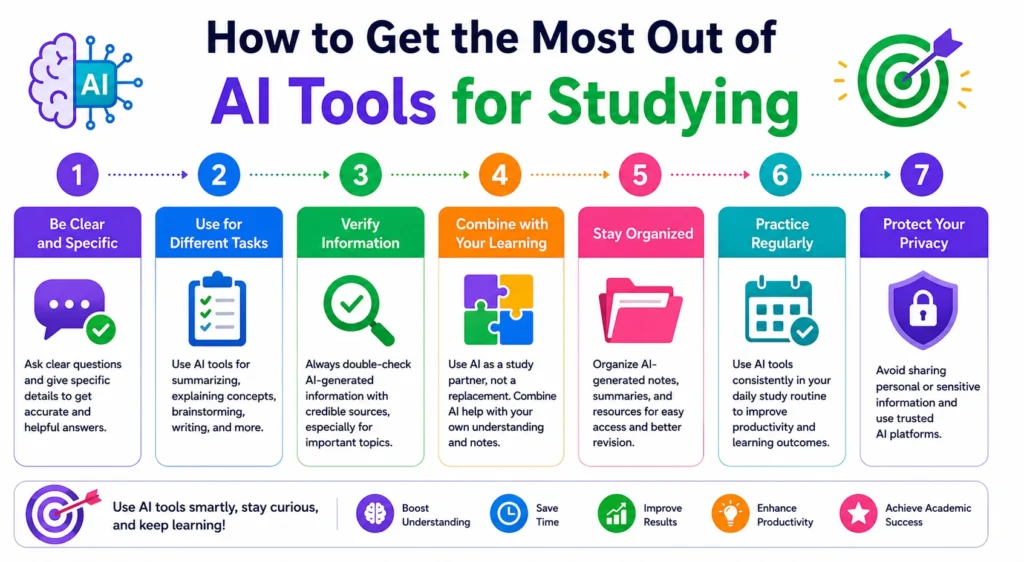
Using AI effectively is not just about choosing the right platform it also depends on how you interact with it. Students who provide clear instructions, verify responses, and combine multiple AI tools often achieve better academic results than those who rely on a single chatbot. Research on prompt engineering and AI-assisted learning consistently shows that detailed prompts produce more accurate and useful outputs. By following a few practical strategies, students can improve learning efficiency, reduce errors, and make AI a valuable study companion rather than just a shortcut for completing assignments.
Writing Better AI Prompts
Instead of asking vague questions, include specific details such as your subject, education level, assignment type, desired format, and word count. Clear prompts help AI generate more accurate, relevant, and personalized answers while reducing unnecessary follow-up questions.
Combining Multiple AI Tools for Better Productivity
No single AI tool excels at everything. Many successful students combine ChatGPT for explanations, Perplexity AI for research, NotebookLM for studying notes, Grammarly for editing, and Gamma for presentations. This workflow allows students to benefit from each platform’s strengths while completing assignments more efficiently.
Common Mistakes Students Should Avoid
One of the biggest mistakes is copying AI-generated content without understanding it. Students should also avoid trusting every response without verification, using AI instead of critical thinking, ignoring academic integrity policies, and relying on outdated information. Responsible AI usage leads to better learning and stronger academic performance.
Building an Efficient AI Study Workflow
A productive study workflow starts with researching topics using Perplexity AI, learning concepts through ChatGPT, reviewing class materials in NotebookLM, improving writing with Grammarly, and organizing projects in Notion AI. Following a structured AI workflow saves time while keeping study sessions organized and focused.
Frequently Asked Questions
Which Free AI Tool Is Best for Students in 2026?
ChatGPT is widely considered the best free AI tool for students because it supports homework help, writing assistance, coding, brainstorming, language learning, and exam preparation. Its free version offers enough features for most everyday academic tasks, making it an excellent starting point.
What Is the Best AI Tool for Essay Writing?
Claude is one of the best AI tools for writing assignments due to its ability to process long documents and generate well-structured, natural-sounding content. Grammarly is also an excellent companion for improving grammar, clarity, and overall writing quality before submission.
What AI tool is best for research with citations?
Perplexity AI is the leading choice for research because it provides answers with source citations and direct references. This allows students to verify information quickly, locate reliable resources, and build stronger academic papers using evidence-based research.
Which AI tool helps with math problems?
For mathematics and STEM subjects, ChatGPT and Google Gemini are among the best options. They provide step-by-step explanations, solve equations, explain scientific concepts, assist with coding, and help students understand problem-solving methods rather than simply giving answers.
Are AI tools allowed in schools and universities?
Yes, many schools and universities allow AI tools, but the rules vary by institution. Most educational institutions encourage responsible AI use for brainstorming, studying, and editing while prohibiting plagiarism or submitting AI-generated work as original.
Which AI tool is best for note-taking?
NotebookLM is currently the best AI tool for note-taking and revision. It allows students to upload PDFs, lecture notes, textbooks, and study materials, then ask questions directly from those documents, creating a personalized learning experience for exam preparation.
Conclusion
AI has transformed the way students learn, research, write, and prepare for exams. The best AI tools for students in 2026 are no longer just time-saving assistants they are intelligent learning partners that help improve understanding, creativity, and productivity. From ChatGPT’s all-around capabilities to Perplexity AI’s research-focused approach, NotebookLM’s personalized study experience, and Claude’s advanced writing assistance, each platform serves a unique academic purpose.
That said, AI should always be used responsibly. It is most effective when it supports learning rather than replacing it. Students who verify information, follow academic integrity policies, and use AI to strengthen their knowledge will gain far more value than those who rely on it for shortcuts.
Ultimately, there is no single “perfect” AI tool for everyone. The right choice depends on your study habits, academic goals, and budget. By selecting the tools that match your needs and using them wisely, you can study smarter, save valuable time, and stay ahead in today’s increasingly AI-driven educational environment.
✨ Don’t stop here, follow newtopy for daily upgrades.